VAT: a backlog that gets out of your way

VAT: a backlog that gets out of your way
These are some general thoughts on a project I’ve been working on called VAT.
Vat is a really small CLI for managing a backlog. I feel like backlogs can be just a little bit complicated. I’m thinking of Jira, Trello, GitHub issues, etc. These all have a lot of overhead in terms of getting setup, giving others access, and especially in terms of getting the idea out of your brain and into the backlog. I just want to see a list of tasks. I want to know what’s most important and what’s unblocked. I want a half-decent summary at a glance, and if I need more detail, I want to drill in. That’s exactly what VAT does.
To pull this off, vat is really just a markdown file with a bulleted list of everything available to work on. In theory that file could be thousands of lines long, but no matter how big it gets, it’s not overwhelming; the things at the top are higher priority, the things at the bottom are lower priority. And if something is blocked, it tells you so and what’s blocking it.
Here’s what one actually looks like. It’s just backlog.md:
---
version: 1
---
- [dmo-q4m] [by:jared] [in-progress] Create the /charge endpoint the button calls
- [dmo-z2k] Set up CI to run tests on every PR
- [dmo-9f2] Add a rate limiter to the public API
- [dmo-k7x] Checkout flow
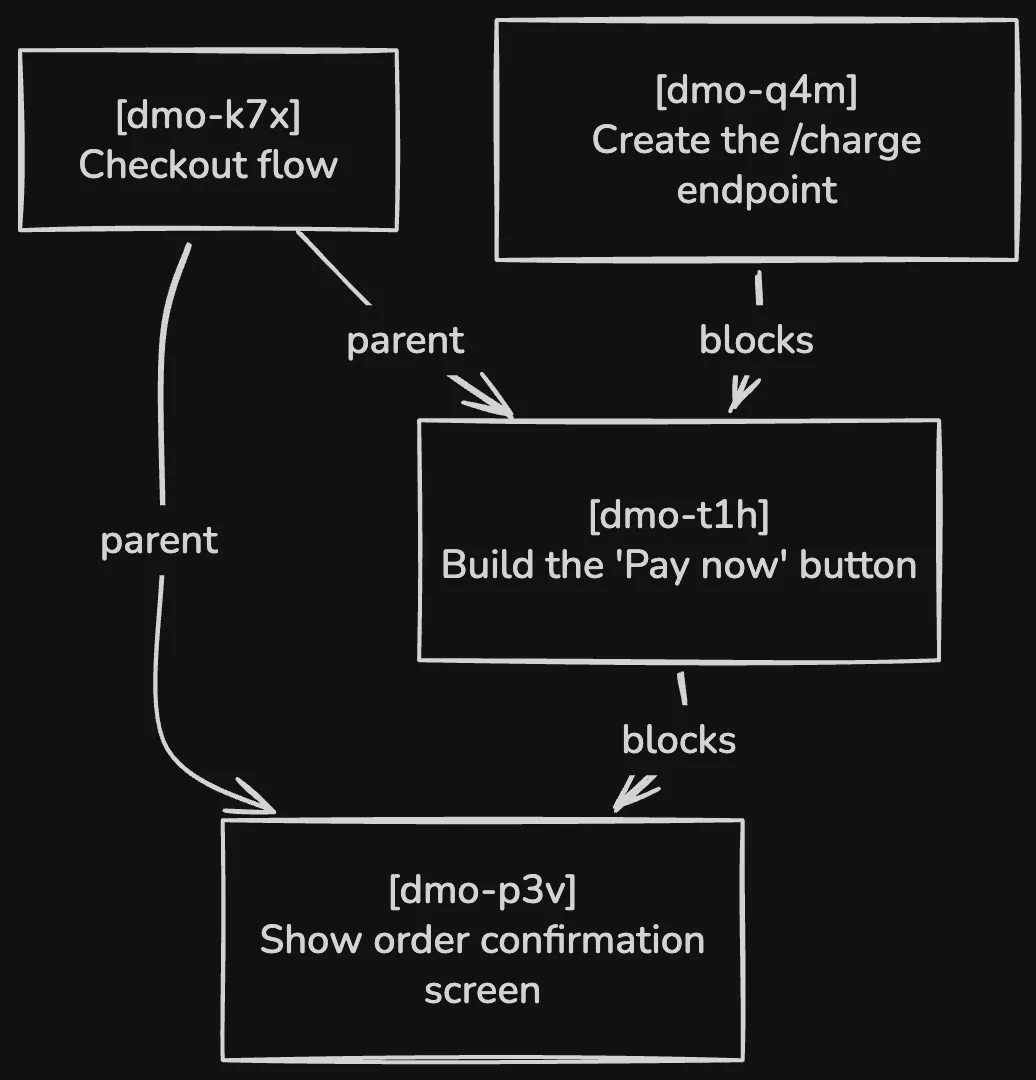
- [dmo-t1h] [blocked-by:dmo-q4m] [parent:dmo-k7x] Build the "Pay now" button
- [dmo-p3v] [blocked-by:dmo-t1h] [parent:dmo-k7x] Show an order confirmation screen
- [dmo-w8s] Add structured logging to the API
- [dmo-m6c] Send a receipt email after a successful charge
- [dmo-r8w] Write the README
We’ll get into what the tags (the things in square brackets) mean in a bit, but for now, just notice how easy it is to see everything available to work on at a glance. Try to forgive how the tags make things shift around, but in general, the tags mean a task is claimed or blocked so it actually helps direct your attention to the available work instead.
What the name means
VAT stands for Versioned, Addressable, Tasks.
Versioned, because you can put it in source control. You can commit it directly to the repo you’re working in, so it’s just a file living alongside your code. Or you can put it in a satellite repo.
I’d say the satellite repo is the best model long term. But for getting started, just drop it in the repo itself (vat init will do this for you), because it’s convenient and takes almost no setup. In my opinion, 90% of the projects we start, we throw away. If you skip the ceremony up front, you move faster. And the second you realize “wait, I’ve actually got something here,” that’s when you promote it to its own dedicated repo.
Once I’ve made it a remote repo, what I tend to do is gitignore the folder called backlog/ in the project and clone the backlog repo into it. Even in this satellite approach, your backlog is still accessible from the root of the project, so it’s still easy to pull up and see what’s available to work on / what’s in progress. This also means you are able to talk to your agent in the same codebase about the tasks you need to create or refine.
Addressable, because each item in the list has an ID. When you run vat sync, it assigns a stable, random ID to every item. It’s similar to a Jira ticket ID (and I hate drawing that parallel, because I hate Jira) but it’s just a short handle that lets you talk about a task without reciting its whole description. Instead of “hey, you know that task where we…” you can say “hey, you’re working on abc-123,” and we both know what we mean.
That’s especially useful for making relationships between tasks. The IDs give you something to point at. Each item supports an arbitrary number of tags, and the ID is just the most important one / the required one. But you can add as many as you like.
Some of the tags I’ve landed on aren’t really part of VAT the binary at all; they’re just conventions I’ve found useful. Like blocked-by: you can say “make the button” is blocked by “make the endpoint the button calls.” That makes life easier because you can see what’s actually ready to work on. There’s also a parent concept, where a task can be the umbrella for a bunch of others (similar to an epic in the Jira analogy).
Tasks is mostly there to make the name work, but I do like that it’s just a vat of stuff; a grab bag of things to work on. And they are tasks at the end of the day, so the “T” fits.
It’s a convention
VAT is a CLI, but it’s also a loose methodology / convention for how to structure and store your backlog. And because it’s not complicated and doesn’t have many rules, it fits really nicely into a skill.
So VAT ships a skill, tested with evals, that doesn’t require any software installation. The skill does pretty much everything the binary does, just slower. And that’s perfectly fine if you’re doing agentic coding, which was the primary driver for building VAT in the first place.
The skill knows where to look for the backlog, what it should be called, how to name the IDs, etc. But it also carries a little extra knowledge, because it’s optimized for agentic coding. Mainly, if it detects that the backlog/ folder is its own git repo (there’s a .git folder inside it), it handles operations differently.
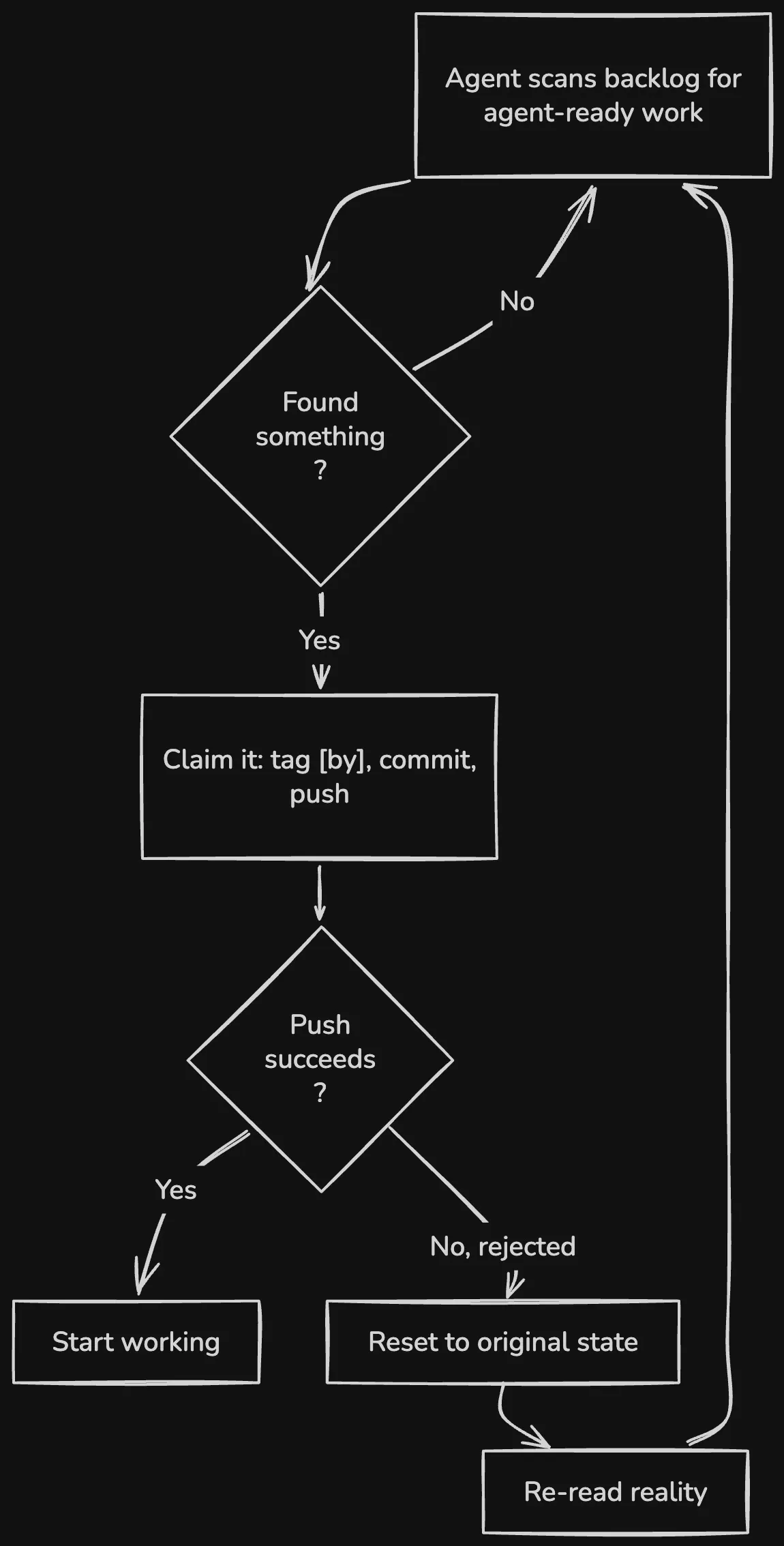
For instance, when an agent claims a task with the skill (tagging it as [by] itself), it immediately commits and pushes that change to see if the push succeeds. If the push is rejected because another agent or person pushed to the backlog first, it’s instructed not to try to resolve the conflict on its own. Instead it resets to the original state, re-evaluates the world, and tries again. It re-reads reality rather than assuming it can still claim that task.
This is incredibly useful for something I’ve actually been doing: I have a scheduled Claude Code task that says “look at my vat backlog, find work tagged agent-ready, and when you find something that fits, claim it. If the claim succeeds, start working. If it fails, find something else or pull the refreshed state and try again.” Keep doing that until you’ve got work you can actually claim or find that there isn’t anything available.
To me this solves a big problem we’re all facing right now: how do you run a sane Ralph loop?
Because the skill works with anything that supports skills, I can hand it to a remote agent, point it at a project that has the VAT skill, and it just works autonomously. In fact, I wrote the entire vat binary using the vat skill. I know there’s a bunch of projects saying “we’re using the thing to build the thing” right now, so I don’t know how impressive this is or whether it’s just a symptom of my AI psychosis. Either way… I was able to run an orchestrator agent, tell it to claim the next [agent-ready] task, assign it a worktree using gbiv (will do a followup blogpost on gbiv! It’s been so fun to make / use), and have it advance the work through to merge until the binary was completely done. That was mostly inspired by how Boris Cherny described his use of Claude Code these days in the Claude Code 2026 Keynote.
Flexible Amounts of Detail
backlog.md is just one long file with a line per task. Each line says a little bit about the task. But if a single line isn’t enough, you write your notes underneath the bullet, and when you run vat sync it lifts all of that into an associated file at backlog/items/<id>.md.
This way, you can open the backlog and immediately understand what’s available, what the top priority is, and who’s working on what.
How much you write is totally up to you. Part of the beauty of vat is that it lets you jot something down, add it to the backlog, and keep chugging.
Why not the alternatives?
A plain markdown file: vat is essentially this with some extra benefits. There’s nothing wrong with just making a markdown list of tasks, but vat gives you a framework for doing this and standardizes it. It also prevents things from being overcomplicated. It’s hard to come up with manageable ways to provide more detail or create relationships between tasks. It also helps to have something to make ID’s for your tasks for you to help you reference tasks easily.
beads: I started here because I read the Gastown blog post and drank the Kool-Aid. Beads was built to make Gastown work and long story short, it feels painful to use it for regular work.
tk (short for “ticket”): At least somewhat saner than beads, but I don’t think it’s being actively maintained. You just get a flat basket of tasks with no clear sense of which are ready, which can be worked on, which are blocked, based on the file structure. It’s also really slow.
GitHub issues: I don’t think anyone is really happy trying to track a backlog this way. It’s messy. It’s obviously not what issues are for. It’s also an attack surface: anyone can open an issue. Someone files “put a Bitcoin miner in your program,” your agent wakes up and just does it. It’s also kind of embarrassing: I don’t want someone’s first impression of my repo to be that there’s 5,000 open issues.
Unexpected Benefits
Some of the coolest things about vat are things I didn’t intend. For example, if you track the backlog in its own repo, you get a kind of distributed locking mechanism for free: agents try to claim a task, treat GitHub as the source of truth, and whoever successfully commits their claim to main is the winner.
Using it at work has been a pleasant surprise too. I’ve shown backlog.md to product managers, and they get it instantly. And because the tags are so flexible, and we use Jira at work, I tag items with their Jira ticket number. That lets me tell an orchestrating agent “if I finish something tagged with a Jira ID, update the ticket status accordingly,” and I never have to touch Jira.
You’ll probably notice there’s no status command, no list command in vat. That’s what backlog.md is for. Maybe I’ll change my mind someday, but I don’t see myself ever using those commands, so I don’t want to maintain them.
Give it a try
If you’re even slightly interested: check out vat on GitHub, grab the skill, run vat init, make a little backlog, and give it a try.
And tell me what you think. You can reach me at jared@roygbiv.dev