GBIV: Named worktrees for parallel and agentic development

GBIV: Named worktrees for parallel and agentic development
These are some loose thoughts on a project I’ve been working on for a while called gbiv.
At its core, gbiv is a way to manage multiple workspaces for the same project, so you can work on several features at once without them stepping on each other. It does this without needing multiple clones since it uses git worktrees. The feature changes never interfere with each other because each one lives on its own branch in its own directory. On top of that, an unintended benefit of the design is that it also supports orchestrating agents to work alongside each other, which I’ll get to later. But that original, core reason it exists is simple: to make it easy to work on multiple tasks at the same time.
Worktrees are great, but error-prone
Git worktrees are a really cool feature on their own. They let you have multiple branches of a repository checked out simultaneously in separate directories, all pointing at a single git history. You don’t have to periodically run fetch in a bunch of different clones per feature. You just have one repo and multiple checked-out branches in their own isolated folders.
What worktrees don’t give you is a sensible way to actually use them day to day. The obvious approach is: “I’m working on feature A, so I’ll make a worktree called feature-a. Oh, now I want to do feature B in parallel, so I’ll make another one called feature-b.” These end up being throwaway workspaces. And this especially hurts if you’re working in a codebase that has a lot of dependencies to install or a long build time: you’ll have to throw away the cached dependencies / build artifacts as well. Also, since they each live in their own directory, you have to navigate to them specially, open them in your IDE, and so on. It’s a lot of one-off bookkeeping.
I’ve found it’s much more powerful if the worktrees have predefined, consistent names. Instead of inventing a new name every time, you reuse the same set of names over and over.
Where the name comes from
To achieve persistent worktrees with predefined names, I’ve settled on naming them after the colors of the rainbow: R-O-Y-G-B-I-V: red, orange, yellow, green, blue, indigo, violet. That’s where the project gets its name.
That gives you seven persistent workspaces for feature development. So you can navigate to it easily, bookmark it, open it as a recent directory in your IDE of choice, whatever works for you.
On top of the seven colors, there’s also a main worktree (literally named main). It’s a nice home base for housekeeping-type of work, and a place where you can see everything that’s being worked on at a glance.
This works better than raw worktrees because:
- The directories are persistent, so you don’t have to hunt them down
- The number of worktrees doesn’t grow unbounded
- Switching between each worktree becomes trivial
How it works in practice
gbiv provides a very simple file for keeping up with what’s being worked on: GBIV.md. It sits in the main worktree, and it’s just a human-readable markdown list of tasks available to work on. If you assign an item in the list a color tag, that tells the system which worktree is working on it.
For example, you tag something with [red] to say the red worktree owns it:
- [red] The UI for opening an account
- [orange] The backend implementation of the account-opening API
- A receipt email after a successful signup
- Rate limiting on the public API
You could treat gbiv.md as the place you track all of your work, but I actually don’t recommend that. I recommend managing your backlog with a separate tool and pulling items into GBIV.md as slots open up.
In fact, I built an extremely lightweight backlog tool called VAT that works great with gbiv. You can read my separate post on VAT, but the short version is that the two work extremely well together. You manage your backlog in VAT, and pull things into GBIV.md as they open up.
Also worth noting, the colors don’t have to mean anything. I personally treat the color slots as first-come, first-serve. There’s no rhyme or reason to what goes in red versus violet. It’s just whatever’s available. The names are memorable and nondescript, so they fit whatever I’m working on.
First-class tmux support
gbiv also has first-class support for tmux. You can run the command gbiv tmux new-session and gbiv spawns a tmux session with a window for each color plus the main worktree. This lets you cycle through all of the colors easily.
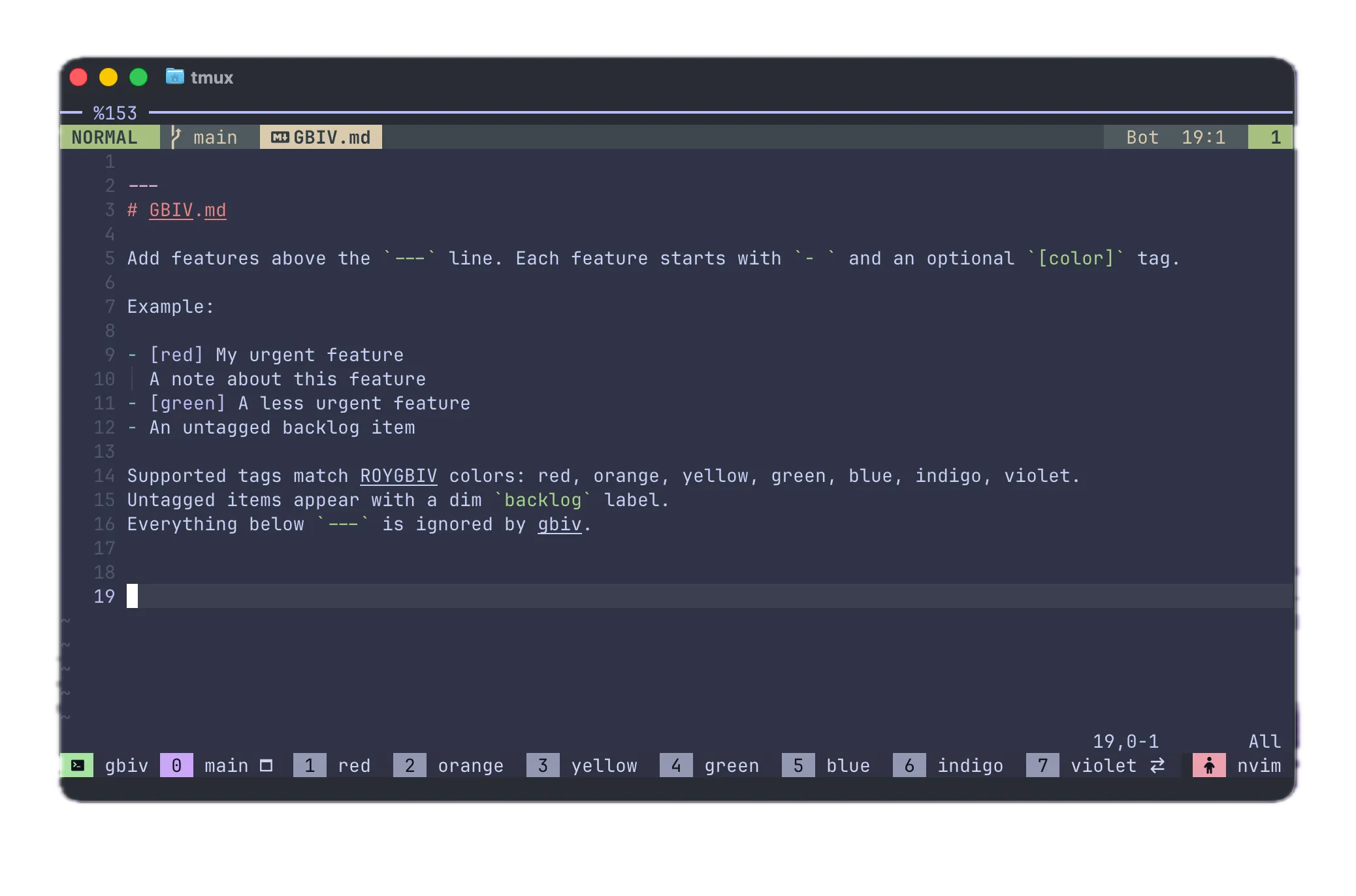
On top of that, gbiv optionally runs a small server that lets you interact with the other workspaces programmatically (via gbiv start). You can send input to a pane, retrieve pane status, and check on the Claude Code sessions running in your worktrees. Right now it just supports Claude Code, but I plan on opening up support for other major coding agents such as Codex.
Orchestrating a fleet of agents
The gbiv / tmux server streamlines parallel / agentic coding. gbiv ships a skill called gbiv-orchestrate that teaches an agent how to talk to the server so it can act as an orchestrator for a “fleet” of agents.
With this, you can have a task assigned to each of your seven color slots, and then tell the orchestrator “please tell each color about its task.” I do this all the time and it works great.
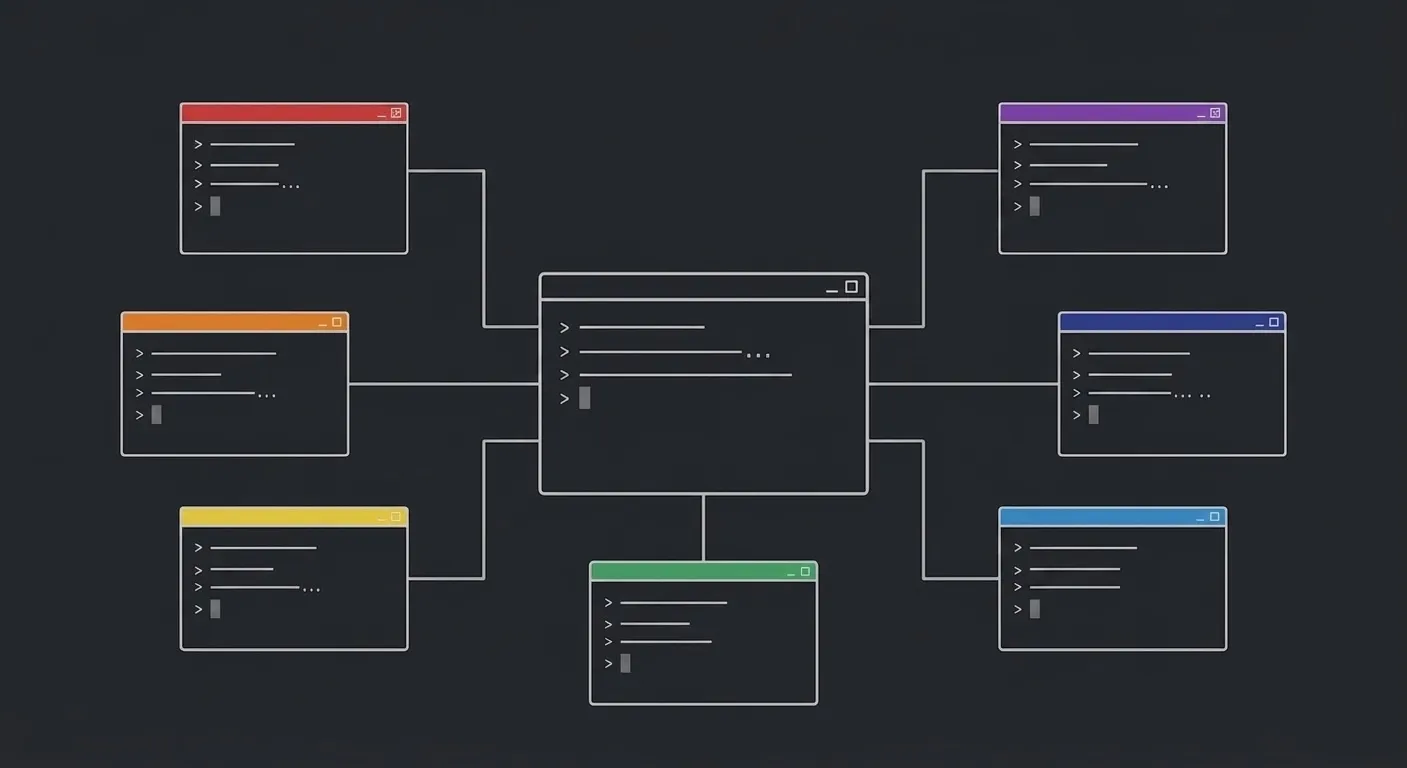
The orchestrator just looks at what’s in gbiv.md. If you’re using VAT too, it also knows to go pull the full description of each task instead of just the one-liner. And I imagine it would work just as well if your full task descriptions lived in GitHub issues or somewhere else. So you say something like “tell each session to work on their task,” and it automatically tells each session exactly what it needs to do.
From there, you can treat the main window as the only place you really have to be. You can still drop into any of the other windows and have a full conversation, which is especially nice for design work, where you want to be more involved, or you can stay in the main window for the more routine stuff (eg - straightforward bugfix or implementation for a feature where design that is fully nailed down).
For that more routine type of work, you can just tell the orchestrator to advance each color, even in a loop (using /loop in Claude Code). I actually finished VAT this exact way. Once it was fully designed and everything just needed to be implemented, I had a VAT backlog with all the remaining tasks, and a loop in the main window telling the agent to continuously advance each section.
The advance skill
To make a loop that can merge PR’s and handle conflicts etc, I built a skill called advance, which follows a predictable pattern. It basically uses a state machine to drive all open PR’s in a repo towards mergeability and eventually to being merged. It also loosely relies on a spec-driven development approach called LID (linked-intent development), which I think is awesome (Shout-out to Jess Szmajda who created LID). I highly recommend giving LID a try.
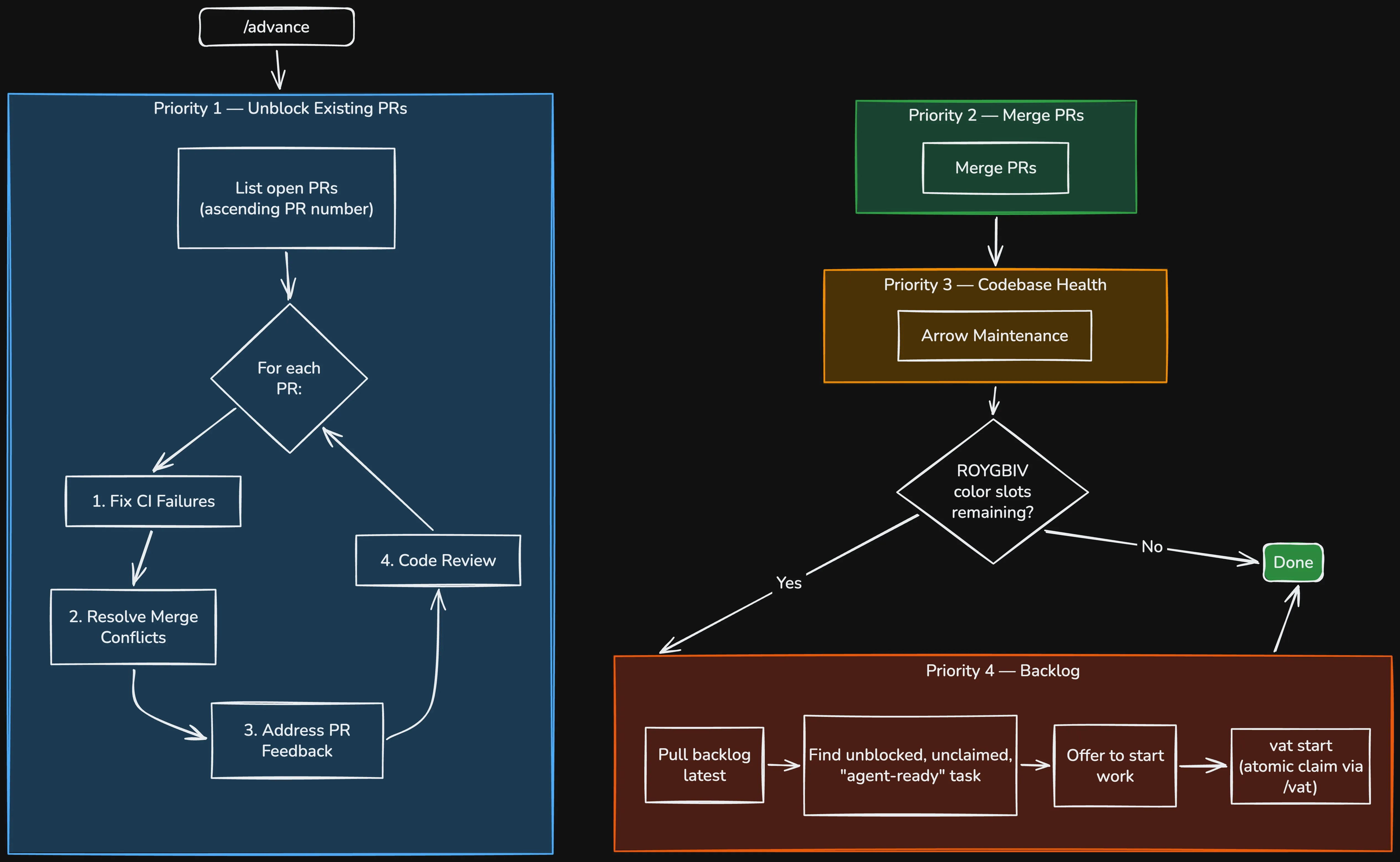
The state machine of the advance skill goes roughly like this:
For each open PR, oldest first:
- Fix any CI failures.
- If there’s no CI failures, fix any merge conflicts.
- If there’s no merge conflicts, address any outstanding PR codereview feedback.
- Otherwise, if there’s no codereview on the PR, do a codereview on the PR.
Once a PR has no CI failures, no merge conflicts, no outstanding PR feedback, and has had a code review, the skill finally will merge the PR.
After that, the skill runs LID’s “arrow-maintenance” skill to ensure the health of the codebase doesn’t degrade.
And after that, the skill looks for more work to pull into GBIV.md from the backlog.
This greatly accelerates the speed with which you can get many PR’s merged quickly without sacrificing quality.
To have advance run in a loop, I said something to the effect of:
/loop 5m run /advance from the top. For implementation, these are fully fleshed out tasks, go ahead and implement to the best of your ability in addition to the normal advance loop.
Watching Claude Code implement the last 10% of VAT on its own was extremely satisfying.
Better prompts as a side effect
Here’s a concept I’m borrowing from something Amelia Wattenberger of GitHub Next explained on episode #680 of Changelog: When you tell the orchestrator to tell another agent to do something, the orchestrator ends up writing a more polished prompt than you would have written yourself.
Side note: In the episode, Amelia talks about Intent which is a super cool sounding IDE that also makes use of parallel agents and a workspace concept, but with an emphasis of providing an actual UI. Maybe Intent is a great thing to look into if you like the concepts I’m talking about in this article, but don’t love being in the terminal.
So you get higher-quality prompts as a side effect of the preprocessing the orchestrator does. Even when I say something as simple as “start working on this task,” it fleshes it out far more than I would have. Without this step, I’d probably just copy-paste the task description to the agent. Instead, the orchestrator makes sure the description, plus any notes and other relevant context, gets passed along.
Example - Implementing feat(vat-46x): /vat skill delegates to the vat binary when installed- #62 in VAT:
🧑 Me: tell red to start work on its task off of a new branch off of origin/main
🤖 Claude: gbiv send red “TASK: implement backlog item vat-46x — make the /vat skill default to the installed vat binary. SETUP: git fetch origin; create a NEW branch vat-46x off origin/main (don’t use whatever stale branch this worktree is currently on). SCOPE: update .claude/skills/vat/SKILL.md so that, before falling back to its prose implementation, the skill first checks whether the \`vat\` binary is installed (e.g. \`command -v vat\`). If installed, the skill delegates the requested operation to the binary by running the appropriate \`vat <command>\` (init / sync / start / block / unblock / done / config) and reports the result. If the binary is NOT installed, the skill behaves exactly as it does today — keep all existing prose procedures intact as the fallback path. The delegation must be faithful: binary and prose must produce equivalent backlog mutations. Note the remote/nested-repo mode (the atomic claim loop from vat-s3p) still applies — when delegating to the binary in a nested-repo backlog, the skill must still wrap mutations in the claim/commit/push loop, since the binary itself is git-agnostic. PROCESS: follow linked-intent-dev — keep the skill EARS (docs/specs/skill-specs.md) and the skill arrow segment (docs/arrows/skill.md) coherent with the new binary-first behavior; add/adjust SKILL-* requirements as needed and flip markers appropriately. This is primarily a skill/prose change; if you touch any Rust, run cargo fmt/clippy/build/test. VERIFY the binary-detection → delegate → fallback logic reads unambiguously. FINISH: commit ‘feat(vat-46x): /vat skill delegates to the vat binary when installed’, push -u origin vat-46x, open a PR against main. Do NOT merge. Do NOT touch backlog/. NOTE: gh needs the sandbox disabled (OSStatus -26276 TLS error).”
You don’t strictly need tmux
Using gbiv with tmux is ideal, but it also works fine if you prefer an IDE. You’ll simply lose the orchestration piece, but it will still work great as a way to do parallel feature development.
Why only seven?
I imagine the first question people have is: why only seven workspaces? Honestly, I just like the colors of the rainbow. I think it’s a fun way to divide things up. Also, people can only hold 3 - 5 things in working memory (without chunking) at a time on average. If you’re like me, you can maybe bounce between 3 - 4 sessions doing real work that requires your brain. I can do more if I’m basically just cycling through to ensure they’re making progress, but beyond seven seems rough either way.
If you do need to go beyond seven, gbiv supports it. There’s an optional config file you can drop under the optional sj.gbiv folder in the main worktree that lets you define arbitrarily many more workspaces. So managing more than seven is totally possible. I just find it’s rarely what I actually want. The cases where I reach for it are weird ones: like when I’m having trouble getting PRs approved, so work is piling up and I don’t want to close the workspaces yet.
Give it a try
That’s about all I can think of for now. I hope you give gbiv a try, and let me know how it works for you.
You can reach me at jared@roygbiv.dev